Choose recipients
For: all users
Goal: the draft transmittal knows exactly who will receive it — or that it is deliberately not being distributed by Fluvial.
Recipients come from contact groups
Recipients are drawn from your project's contact groups (e.g. Design Team, Head Contractor) — named bundles of contacts, each an external party with an email and optionally a name and company. Groups are managed in the project's Contact Groups area and reused across its transmittals; see Contacts and contact groups.
A transmittal is always addressed to a group — so if the person you need isn't in a group yet, add them there first.
Steps
- On the draft transmittal, open the recipients section.
- Choose one group under Issue to, and optionally a second under CC. Everyone in either group gets their own email and their own portal link.
- Or, if this transmittal is distributed outside Fluvial, select No distribution.
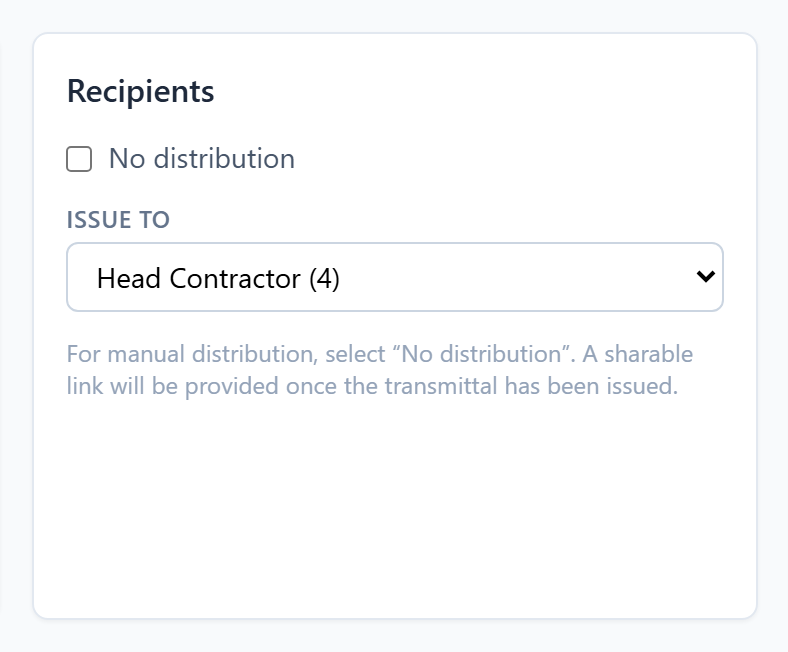 Pick a contact group — or explicitly select "No distribution".
The issue gate requires one choice or the other: a transmittal with no recipients and no explicit "No distribution" cannot be issued.
How many recipients one transmittal can have
A transmittal can be sent to up to 50 recipients, which is the maximum size of a contact group.
Issuing transmittals also draws on your account's daily email allowance, which depends on your plan. If a draft has more recipients than the allowance you have left, Fluvial says so on the transmittal before you issue it rather than failing halfway. Both figures, and how to have them raised, are in Limits at a glance.
Snapshots keep the record true
At issue, the recipient list is frozen into the transmittal. Later edits to your contacts and groups never alter what an issued transmittal says was sent, or to whom.
Editing recipients on a draft does not reset approvals; approvals attest to the document set, not the address list.
Result
The draft shows its recipient list (or "No distribution"), and the "Choose recipients" blocker clears from the issue gate.