After issue — resend, share links and access history
For: all users
An issued transmittal can never be edited. From the issued view you can resend it, share it, and see exactly who has accessed what.
Resend to a recipient
Someone lost the email, or it went to a full inbox:
- Open the issued transmittal.
- Resend to the recipient. They get a fresh copy of the original issue email with their portal link.
Resending re-delivers the original record — same documents, same transmittal PDF. It is not a way to send updated files; that's a new transmittal.
Copy a share link
For ad-hoc sharing beyond the original recipients, or for sharing with contacts via direct email:
- On the issued transmittal, select Copy share link.
- Paste it wherever needed. Anyone with the link sees the same portal page.
Share links behave differently from recipient links:
- They expire after 30 days (recipient links don't expire).
- Access through a share link is logged, but as "Unknown" — the link isn't tied to a named recipient.
- You can revoke a transmittal's share links at any time, which kills every copy of that link immediately. Recipient links are unaffected.
Access history
The issued transmittal's access history shows, per recipient, when they opened the portal and what they downloaded — your answer to "did the contractor actually get Rev C?" backed by data rather than a phone call.
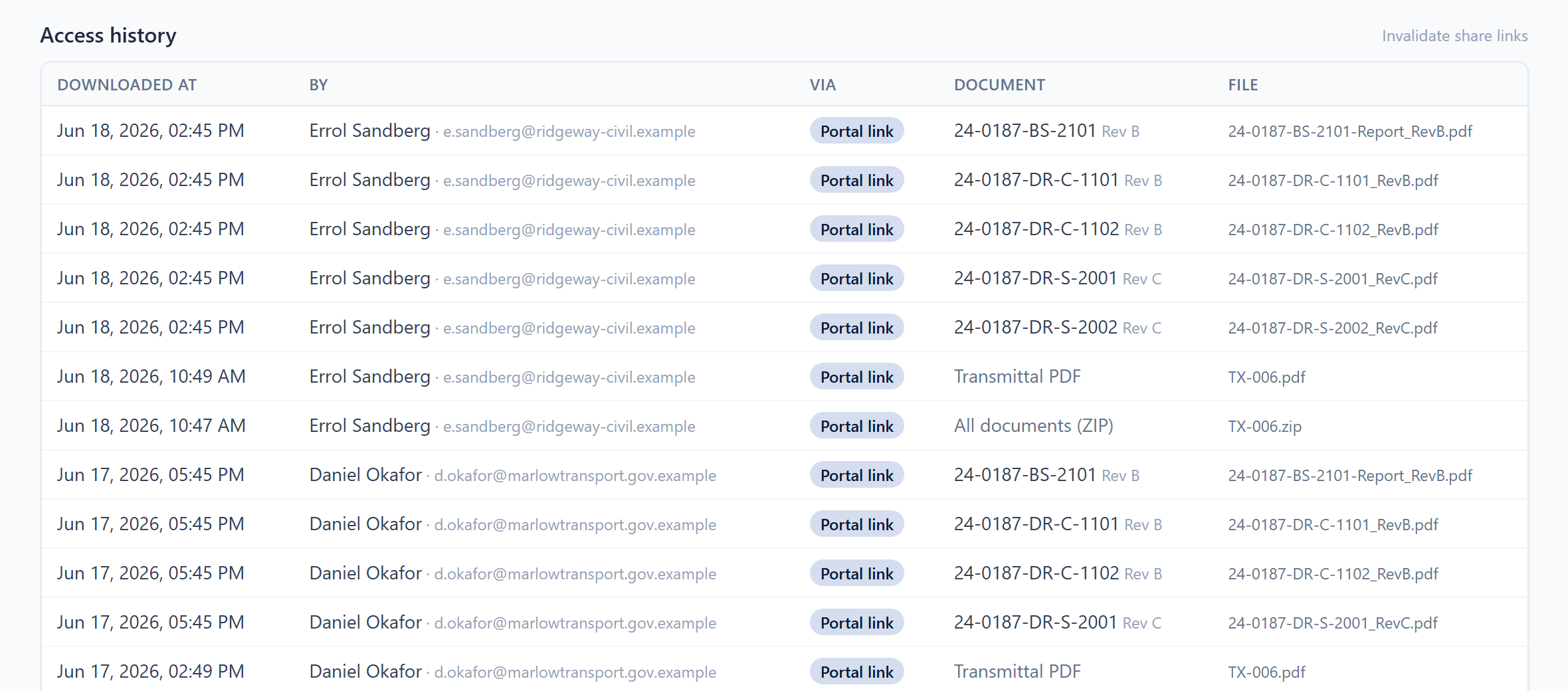 Access history — portal visits and downloads, per recipient.