Contacts and contact groups
For: all users
A contact is an external party you issue documents to — an email address, plus a name and company. A contact group is a named bundle of contacts, such as Client and Superintendent or Design Team.
Groups are not just a convenience: a transmittal is addressed to a contact group, never to individual contacts, though it can be forwarded to individual contacts post issue. Before you can issue transmittals, the people who will receive them must exist as contacts inside a group.
A group holds up to 50 contacts. Limits at a glance.
Contact groups belong to a project
Groups live inside a single project, alongside its documents and transmittals — open a project and select Contact Groups in the left-hand menu. A group created in one project is not available in another; if the same distribution list applies to two projects, create it in each.
What a group holds
Each contact in a group has:
| Field | Required | Notes |
|---|---|---|
| Yes | Where the transmittal email and portal link are sent. | |
| First name / Last name | No | Used to address the email and to identify the recipient in the access history. |
| Company | No | Shown beside the recipient throughout the transmittal record. |
A contact belongs to exactly one group. To send to the same person as part of two distribution lists, add them to both groups — a duplicate email address across groups is fine. If someone ends up in both the "to" and the "cc" group of one transmittal, Fluvial records and emails them once, as a "to" recipient.
Building a group
There are two ways to add people:
- One at a time — fill in the row at the top of the group and select Add contact.
- Bulk paste — click Bulk add contacts, copy the recipients straight out
of an email, and paste them into the presented dialog, e.g.
Jane Doe<jdoe@consulting.com>; John Smith<john.smith@example.com>. Fluvial splits the names from the addresses and tells you how many it added. Entries that aren't valid addresses, or that are already in the group, are skipped.
Edits to a contact save as soon as you leave the field — there is no Save button.
How a group is used on a transmittal
A draft transmittal picks one group as Issue to, and optionally one more as CC:
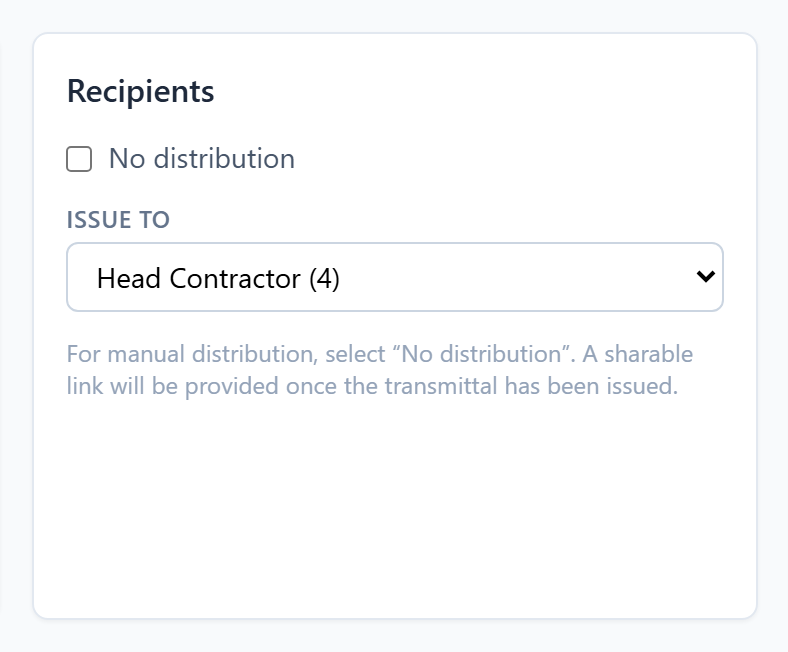 A transmittal is addressed to contact groups — one "to", one optional "cc".
Everyone in the chosen groups receives their own email and their own private portal link, whether they're on the "to" or the "cc" line. The count beside each group name in the dropdown is how many contacts are included in that group.
If a transmittal isn't being distributed through Fluvial at all, select No distribution instead — see Transmittals.
Changing a group never changes an issued transmittal
At issue, a record of the recipient list is copied into the transmittal permanently. From then on the group and the transmittal are independent:
- Adding, removing, renaming or re-emailing a contact has no effect on any transmittal already issued.
- Deleting a group clears it from any draft transmittal that had it selected (you'll need to pick a recipient group again before issuing). Issued transmittals are untouched, and their portal links keep working.
Bounced addresses
If an email to a contact hard bounces (the mailbox doesn't exist), Fluvial removes that address from the contact groups it appears in and notifies your account's primary contact. You'll need to add the person's new address when you have it.